What is Wallpaper Engine (2026): How It Works & Is It Safe?

Table of Contents
Desktop wallpapers existed as early as 1985 in Unix systems, but they became a mainstream consumer feature with Windows 3.0 in 1990 and were fully popularized by Windows 95. These days, wallpapers are usually the first things to edit when you get a new machine. After all, personalizing your desktop is the best way to feel comfortable with your gaming or working environment.
Wallpaper Engine takes it one step further, where instead of a single image as your wallpaper, it allows you to have an animated wallpaper filled with custom shaders, videos, and even reactive elements like audio visualizers, and more. This new wave of wallpapers has created a whole new community dedicated to creating both visually stunning wallpapers, and technically impressive ones.
In this guide we will cover what is Wallpaper Engine, how Wallpaper Engine works, is Wallpaper Engine safe, and how to use Wallpaper Engine.
What is Wallpaper Engine

Wallpaper Engine is a paid application that allows you to create and download interactive animated wallpapers on your desktop. Its first early access build was released on Steam in October 2016, and left its early access stage in November 2018.
It quickly amassed a community that was dedicated to bringing their favorite characters, and scenes to life across gaming, movies, series, anime, and more. Today, the community has created over 2.8 million wallpapers on Steams Workshop across these categories, with dozens being uploaded each day.
How does Wallpaper Engine work
While Wallpaper Engine is proprietary — meaning we can’t directly inspect its source code — we can infer how it works from official documentation and observable behavior.
In practice, Wallpaper Engine integrates with Windows’ desktop rendering system and draws its own content in place of the static wallpaper image. Instead of setting a traditional background, it creates a rendering surface at the desktop layer and continuously renders frames there.
This effectively lets it take over the role of the wallpaper at runtime, enabling it to display animated scenes, play videos, or even run web-based content.
Because it uses standard graphics APIs like DirectX, it can leverage GPU acceleration to render effects such as particles, lighting, and shaders in real time, similar to a lightweight game engine.
Is Wallpaper Engine Safe
Wallpaper Engine is generally safe to use, but its security depends on the type of wallpaper being used.
Built-in scene and video wallpapers run in a controlled environment and are considered low risk. However, web-based wallpapers use technologies like HTML, CSS, and JavaScript and are rendered through a Chromium-based engine, meaning they can behave similarly to web applications.
Additionally, application wallpapers can run external programs, which may have full system access depending on the software.
Because of this, safety largely depends on the source of the wallpaper. Content from trusted platforms like the Steam Workshop is moderated, but users should still be cautious when running wallpapers that include scripts or external applications.
How to Use Wallpaper Engine
Wallpaper Engine is extremely simple, and intuitive. You control it from one single interface never needing to visit external sites like the Steam Workshop.
There are exactly three relevant tabs for Wallpaper Engine.
Installed Wallpapers
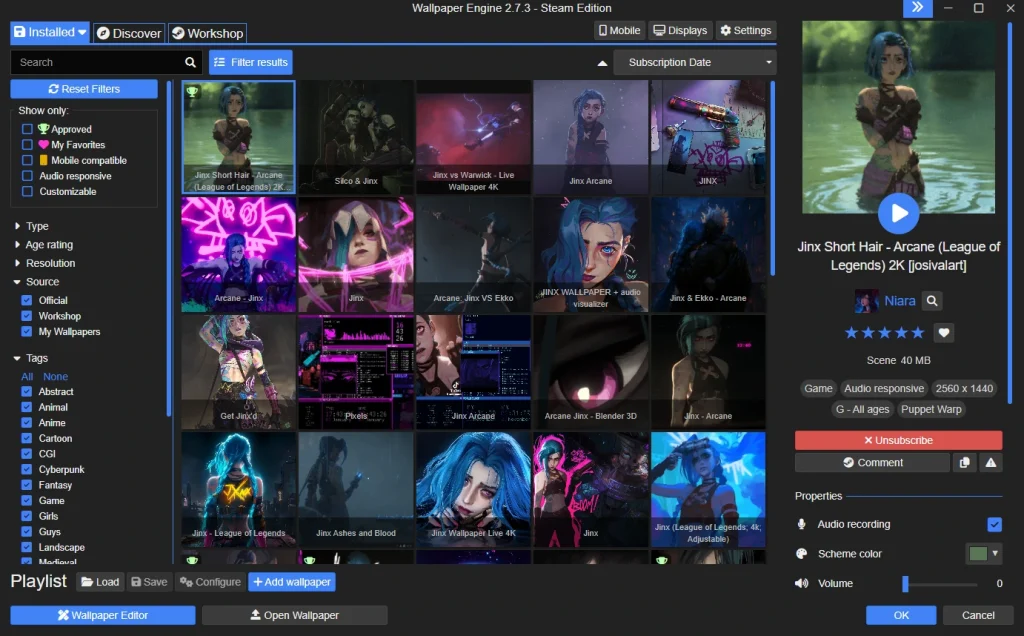
The installed tab is where you will spend your time browsing wallpapers you’ve gathered from the workshop.
Just like it, to the left you have a set of filters to sort your wallpapers by age rating, category, resolution, and more.
The middle section is a grid view of all installed wallpapers on your system right now.
To the right is where you customize the wallpaper with features it exposes, more often than not toggling effects like fog, rain, or similar. You can also change the wallpapers volume here too.
The image above showcases Jinx related wallpapers. Read my Top 20 Best Jinx Themed Wallpapers for 2026 to find the best ones, today.
Discovery Tab
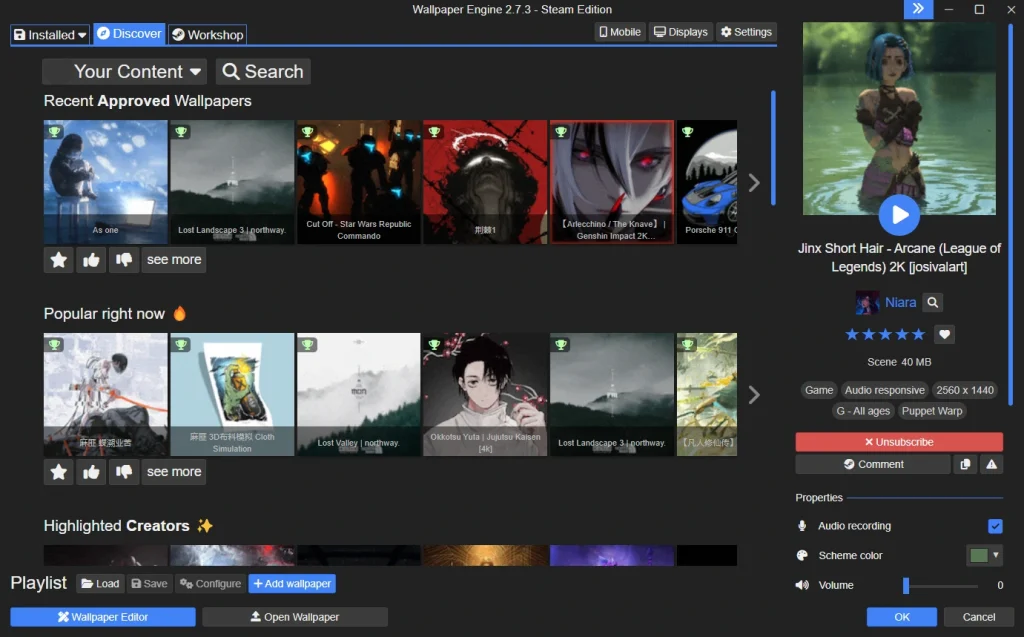
The discovery tab holds collections of wallpapers, including whats currently popular, and wallpapers that have recently been approved.
More often than not, you can find some really talented creators here that are often chosen by the Wallpaper Engine team.
The discovery tab also shows most popular wallpapers for specific themes such as Lofi, Cyberpunk, and anime specific wallpapers.
Steam Workshop
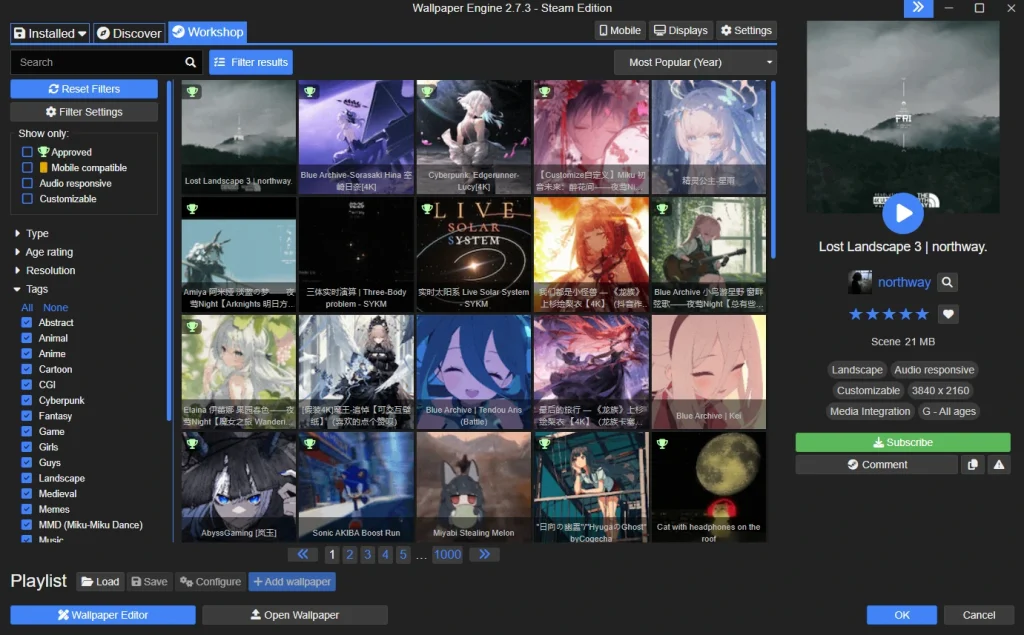
The workshop tab is where you will spend 80% of your time in. It’s a hub of all the published wallpapers.
To the left, you have the same filter controls you had before, where you can filter out wallpapers for categories, resolution, or age rating.
In the top right, there is a small drop-down menu where you can filter based on recency — Last week, month, year, or just all time best rated wallpapers under whichever category you picked.
To the right are some extra details about the wallpaper, including the “Subscribe” button, which when you press, will start the wallpaper download, and automatically equip it.
Supported Platforms
Wallpaper Engine currently supports Windows through Steam, and Android with their companion app. They do not have official apps for Mac, iOS nor Linux.
While the official Steam application is paid, their Android companion app is free, and connects to your installed Wallpaper Engine instance on your desktop. To learn more, and download the app, visit their official page.
Key Takeaways
Wallpaper Engine continues to be the best source for animated wallpapers of all kinds for your desktop. With over 2.8 million wallpapers, this application is here to stay, and in fact you can start contributing too by learning how to create your own wallpapers.
Make sure to explore my top wallpaper picks such as the 10 best Resident Evil Requiem Wallpapers on Wallpaper Engine to find new wallpapers to decorate your desktop with.
FAQ
1. What is Wallpaper Engine?
Wallpaper Engine is a paid application that allows you to create and download interactive animated wallpapers on your desktop. It has a large community with over 2.8 million wallpapers created to date, and counting.
2. Are Wallpapers on Wallpaper Engine Safe?
Generally, yes, as wallpapers submitted go through approval. Built-in scene and video wallpapers run in a controlled environment and are considered low risk. However, web-based wallpapers use technologies like HTML, CSS, and JavaScript and are rendered through a Chromium-based engine, meaning they can behave similarly to web applications. Always double check the source of the wallpapers, and only download from official Steam Workshop links.
3. Does Wallpaper Engine Affect Performance?
Some wallpapers can be performance heavy, but Wallpaper Engine is smart about this, and often limits the FPS (Framerate) of the wallpaper on top of pausing it whenever you’re not looking at the desktop. However, the power of your GPU still matters when running complex wallpapers, as they can still lag.
4. Is Wallpaper Engine Free?
No, Wallpaper Engine costs $4.99 on Steam. Sometimes, it can drop down to $3.49 when on sale.
5. How To Download Wallpapers from Wallpaper Engine?
The easiest, and fastest way to download wallpapers from Wallpaper Engine is to visit the Steam Workshop tab in the application. You can sort wallpapers by category, resolution, or age range to find wallpapers you like.
6. Can You Use Wallpaper Engine on iPhone?
Unfortunately, Wallpaper Engine only officially supports Windows (through Steam), and Android with their companion app. They do not have plans to support Mac, iOS, nor Linux for the foreseeable future.
7. What is The Best Free Wallpaper Engine Alternative?
Currently, the best free Wallpaper Engine alternative is Lively Wallpaper. Read my post “Lively Wallpaper vs Wallpaper Engine” to understand the pros, and cons of each.